Showing posts with label Android. Show all posts

WhatsApp is now on Web!!

I was fiddling around my phone these few days because for some reason it has been lagging like mad! I cleared out the memory as much as I could, removing apps that I thought I needed but never actually used and deleting photos and age old messages. It was then that I found out that WhatsApp has had a recent update - WhatsApp Web!

So, what is it? In a nutshell, WhatsApp now sync's with your internet browser - for the time being this feature is limited to Google Chrome, and is yet to be available for iOS users (wonder if I should start yet another Android vs iOS war) and requires both WhatsApp and Chrome to be the latest version. For WhatsApp, this is Version 2.11.498, and for Chrome it's version 39.0.2171.99. That said, I'm almost certain in the near future everyone on WhatsApp will be able to use this feature regardless of platform and machine. 

WhatsApp Web is a client - an extension of WhatsApp on your mobile phone. If you have the latest version, tap on the three dots in your main WhatsApp screen, and tap on WhatsApp Web. While doing that, go to web.whatsapp.com and you will see a QR code displayed. Go back to your phone, scan the barcode and wait for things to sync up. Voila! you no longer have to take 5 minutes off your screen to check on messages!

For me, this feature is very very useful. That few minutes taking time off screen to check for messages are like hiccups throughout my productive hours. Don't forget the need to unlock the screen, getting to notifications and waiting for the app to load, and then when a full on conversation ensues, productive time is put on pause. With the WhatsApp Web client for Chrome, I can just Alt + Tab my way to the messages, 10-15 seconds to reply and be back to work without my hand ever leaving my keyboard. Genius!

Let me know in the comments if you find this new feature is just as helpful to you as it is to me! Just don't forget to close Chrome or lock your PC / Laptop when you're not at your desk lest you risk third and fourth sets of eyes reading through your messages!

Safe and secure

Scan the barcode with your phone

Just like WhatsApp mobile

Non-intrusive desktop notification!


The Future Is Here! Introducing the world's first social robot, Jibo!


Imagine Star Wars C3P0 and R2D2, imagine Wall.E and EVE, imagine Marvin the Paranoid Robot (from The Hitchiker's Guide to Galaxy?), David Swinton from A.I, Sonny from I,Robot, Data from Star Trek! Well some may argue that one or more of the listed are cyborgs, not robots, but hey, if some genius out there managed to build one, and build one for the consumer, aren't we all game for it? 

I'm sorry Google Glass, your capabilities really astound me but you're just too expensive for such a small device that achieves the same tasks as my Android smartphone can. Move over Siri, you're so uptight sometimes. Welcome Jibo, the world's first family robot. 


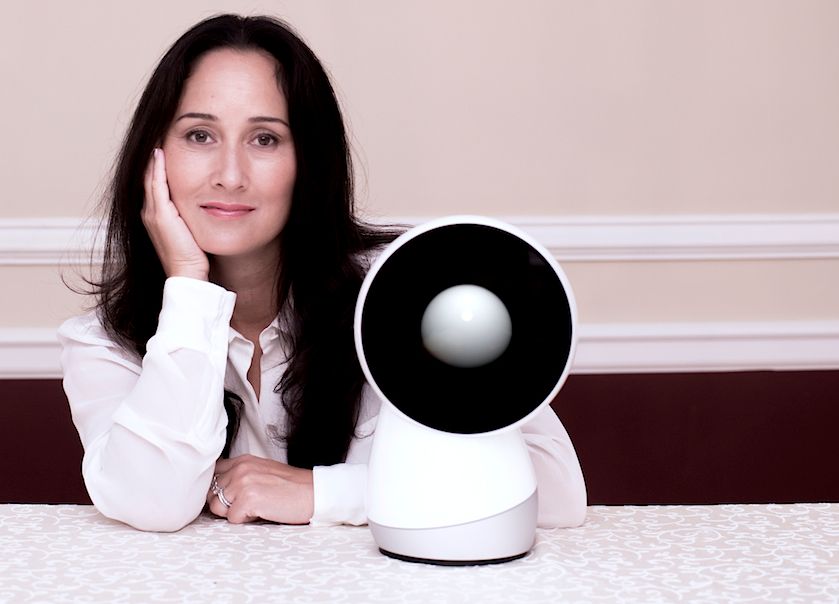
Cynthia Breazeal and Jibo
Created by MIT roboticist Cynthia Breazeal, Jibo is a finalised version of a work-in-progress, with developer and consumer version scheduled to be available sometime in 2015. OMG I can barely contain myself! It's finally here! 

It's not just a tool that you use, it's your helpful partner! 

Yeap, that is what sets Jibo so far apart from other consumer technology approaches for instance smart-homes etc. Implementing emotion and intuitiveness as the core of its design, Jibo "learn skills" rather than "installing apps". Of course the whole idea is to develop a platform on top of which developers can program skill algorithms and machine learning capabilities (hopefully), but consumers in general are not interested in those technobables. 

The initial skills that Jibo has are oriented towards coordinating a busy family, especially one that does not live together under the same roof, helping with communications and bringing contents to life such as warm and friendly greetings and reminders. A key feature was the camera as a social tool. Whereby with a physical camera be it a high end DSLR or a phone camera, it is a tool and you remove yourself from the action but with Jibo, it can help to take the photo for you without much hassle of finding a substitute person and everyone can be in with the action. 

The consumer wants a helper that integrates into their lives - managing the household to a certain extent for instance turning on the lights at night when someone walks into the room, changing the air-conditioning temperature, taking calls and messages and reading aloud emails and alerting scheduled items - and not just that, the consumer also wants to do all these with the feel of interacting with someone. 


Jibo is just that. In different instances Cynthia was quoted to say "putting a warm personality on a lot of the things that we use or apps for today" and "Jibo is one of the first of its kind to humanise way of relating and experiencing technology". It is capable of recognising individuals through visual (face recognition) and audio (voice recognition), a great way to personalise experience with Jibo itself. 

I am super excited that Jibo is going to be out in the consumer market soon, and that Cynthia has taken the crowdfunding route to collect funding for it. To keep up with the latest news on Jibo or to get one for yourself, visit www.myjibo.com or add the blog to your reading list at http://blog.myjibo.com/. You can also contribute to the Jibo project through IndieGoGo


In the mean time, check out this awesome introduction video of Jibo! 


*Disclaimer: Photo and Video are owned by respective owners. I do not claim them to be mine. 

Telco Battles: Of Prepaid vs Postpaid, Coverage and Reliability

It's tech talk time! (Try saying that 10 times over as fast as you can). If you're like me who's constantly online (except when I'm socialising with other people cuz that'd be rude) you'll know about the small little voice behind your head that constantly warns you "internet quota - how much do I have left this month - can I play this video without exceeding my quota - can I visit this page without getting a bill shock at the end of the month" and of course the relief of WiFi connection. 

Maxis has recently launched a new product named MaxisONE Plan - aiming to provide customers the freedom to connect and communicate the way we want to. We all know that calls and sms are a thing of the past with the emergence of smartphones and mobile data connection. Sure, in selected cases (mostly parents) calls are still frequently used, while among peers, friends, even business communications, instant messaging are preferred so as not to incur any extra charges. While in years before postpaid users worry about bill-shocks due to excess calls and sms as the end of the month, these days we worry more about being excessively charged for mobile data. 

So Maxis spearheaded a breakthrough - paraphrasing Dusyan Vaithiayanathan, the Head of Consumer Business "we as service provides has benefited from charging calls and sms rates, and now mobile data rates to the users. It is time for us to give back". And honestly, I could not agree more. With MaxisONE, one does not need to worry about how much calls and sms they use at the end of a bill cycle - it's free! 

Wait, what? Free Calls and SMS? 

Yes, free calls and sms. MaxisONE offers a simple plan that focuses more on what our generation use - data. With a special interest of providing not only high-speed LTE coverage on top of wide 3G network but also providing reliable connection wherever there is coverage! Cheers to that! Just as much as we hate dropped calls and undelivered sms, we also hate having to reload a website or replay a video because we were abruptly disconnected from the data network. 

So yes, free calls, free sms - not just between Maxis to Maxis, but to ALL network! This is great news for those who pay for both calls and sms with a data plan every month! It really saves up on your bills! With both calls and sms free and unlimited, what you only need to choose is how much data you need! 


Facebook? Youtube? Instagram? Whatsapp? How much data do I need?

In the race to provide specific group of consumers with what they specifically need, network service providers tend to confuse their customers. Honestly, I am just as uncertain about my plan as the dude next to me! But Maxis has made it easy by giving you a choice of 1GB, 2GB and 3GB quota a month. Additionally, it's a flat rate of RM30 for every extra 1GB you need a month, or if you just need a slight boost, it's RM10 for 200MB, and RM20 for 500MB. 

So what's the difference? I'm still bound by quota! 

Hold your yappin, I'm not finished yet! MaxisONE offers something thy call an Always ON internet experience - which means that even though you've used up all your internet quota for that billing cycle, you're still connected, albeit at lower speed. 

Okay.. sounds reasonable.. What else is there?

Together with MaxisONE, new devices are also available such as HTC Desire 310, Hwawei Y530 and Samsung Galaxy Ace 3. These are FREE when you sign up for the plan. Other higher performance devices are also available. 

If you're also a frequent flier especially overseas, you'll rest assures that Maxis roams in 106 countries at a flat rate of RM38 per day. With that in mind, you won't have to worry about pay-per-use data and bill shocks ever again! 

Great! Where do I sign up?
The simplest most effective way to sign up is to visit any Maxis center near you or any Maxis Exclusive Partner store nationwide. You can also visit Maxis Online Store here and read more information on the MaxisONE plan here

And as usual, a gallery of shots! >.<

A day out at the beach - D'Cove

First of all, IF there are any spelling errors a.k.a typos, please forgive me. I'm a little tired from work - brain is basically so dead that even zombies would lose appetite! >.<

Last Sunday, after little dilly-dallying during lunch, me and my friends (a brother) included decided to go to the beach. The weather was just fine, a little windy but the sun was hiding behind the clouds.. PERFECT day to spend at the beach.. 

I can't remember when was the last time I went to the beach. To be honest, the drive turns me off. Yeah yeah, it's only half-an-hour or so according to some people... still, the road was bumpy... aaannnndddd.... if you happen to drive behind a slow driver, it can be a "dangerous" drive.. 

aaaaaaannnyyyywwaaaayysssss... we got there nonetheless.. and snapped a whole lot of pictures! This is my favourite!

Took it with Android SphereCam.. you can view the sphere here
SphereCam may not work properly on mobile devices. I suggest you go to your desktop and enjoy some of the spheres I took there instead.. 

An almost 360 Panorama of D'Cove

A new attraction : Whale Bone!

Ice Cream Goyang in the making! 


More spheres can be viewed here and here. These, however, are experimental and are epic fails!! hahaha!

Cheerss!! >.<

P/S : Sorry for the external links to the spheres.. I can't seem to be able to find out how to embed them into the post.. >.<

The world through lenses : VSCO Cam!

I distinctly remember my team leader asking "Do you still have time to write blogs?" To which I answered yes. Then I realized I haven't sat down and write in quite a while - what with juggling an 8 to 5 job (well.. it's actually 8.30 to 5.30 but it's the same nonetheless), classes on weekends (which don't officially start until February) tutoring (which is just once a month) and gym almost every day. 

Like every other average person on the web, I keep up with posts on Facebook and Twitter and what my fellow bloggers write. One day, another blogger shared an app for her iPhone called VSCO Cam. Basically, it is just another photo-editing app, and she just recently found out it was available for free on Apple's Store. Knowing her, she is very very meticulous about the photos she took - and taught me a thing or two about using a DSLR. So I went on Google's Play - I'm on android - and downloaded the app. I fell in love with it instantly. 

So what sets VSCO Cam apart from the likes of Instagram, Pixlr Express, and FxCamera is the focus of the photo-editing app itself. While other apps attempt to enhance and define your photos - especially smoothing the skin, changing the skin-tone, adding effects here and there to accomplish that, VSCO Cam aims to compliment your photos. 

VSCO Cam not only allows you to add effects to your photo's, it gives you the flexibility to fine-tune the effect so that the details that you captured does not get lost. Exposure, Temperature, Contrast, Crop, Rotate, Fade, Vignette and more can be individually controlled and adjusted to fit the look you are trying to accomplish. 

The interface is sleek and simple - no overwhelming nests of menus and options cluttering the screen - no messy buttons to press and no confusing or misleading texts - just simple icons and precision sliders. And if you worry about losing the capability to share you photos on Facebook or Twitter, fret not - these features are also available in VSCO Cam

Here are a few shots I edited with VSCO Cam. Enjoy!! 

Top : Original  ;  Bottom : After VSCO Cam

Left : Original  ;  Right : After VSCO Cam


Top : Original  ;  Bottom : After VSCO Cam

If you're on Android, click on the Play button below to get VSCO Cam and start your own professional photo editing experience! Also available on Apple App Store.


Rekindling Childhood Memory : Super Mario Bros!

I haven't given up totally on the kids of today's generation - nose so deep with their technologies, their iPads and Samsungs, their Facebook and Instagrams, online gaming and such. When I was a kid my mom would practically kick me out of the house to play outside when we wanted to play games on our Nintendo 64 back then. But when I showed my 6 y/o grandson (urghhh.. I feel old) this game I played when I was a kid, he fell in love, dropped his Nintendo DS and entertained himself for a good half an hour trying to pass the levels. 

To the generation that is mine, kids of the 80's, I present you, a blast from the past : FULL SCREEN MARIO! It is THE game on Nintendo 64 back then -  a must have entertainment especially for rainy days (of course we MUST finish our homework and earn a few hour on it. Remember back then? No save points, no memory cards, not even a feature to select the stage! we have to play it from the beginning every single time, yet was never bored by it!

It is what it is, folks, I sh*t you not. A full remake of Super Mario Bros. from Nintendo 65 using HTML5. It's the fifth version of HTML (that's HyperText Markup Language) and provides better multimedia support for browsers on any platform. The aim is to improve the sHTML standard so that it can service more range of multimedia input and output (not only pictures, videos and audios but also animation and interactive media) while maintaining human readability and consistently understood by computers and devices.

I suspect that Full Screen Mario is built to demonstrate the capabilities of HTML5 in handling multimedia support - but regardless of the purpose, it is just simple amazing that someone put up a huge effort in developing it for the web, and best of all, free of charge! You can also choose to donate - say a thank you for their effort. Kudos to the developers!

For those who wanted to reminisce on their childhood memory, or even try to persuade your own kid to play the game you played as a child, give it a go at www.fullscreenmario.com. The game can be played on any browser, does not require any installation and there is no ads or malicious software (think of it as just surfing a site that is interactive). It is possible to play it on your mobile devices given you have a keyboard, but I haven't tested it out yet. If it works, do let me know. If it doesn't, well let me know anyways! Ahahaha!

**P/s : not all kids can appreciate the 8-bit pixelated graphics that is Super Mario. It takes a special breed. My nephews of 10 and 12 both commented "It's like they're not even trying back then."  ~.~"

Evolve them ALIENS!!!

Tired of losing lives at Candy Crush? All huffin' and puffin' about Temple Run and not getting anywhere? Can't sleep thinking of your Plants and Zombies? Well, lemme make an attempt to bring you out of your (current) misery and introduce you to a new addiction - Alien Hive
Sliding Tile Puzzle

LOL I made myself sound like a cheesy salesman there. But in good faith, if you remember the sliding tile puzzle - hours upon hours spent trying sliding and attempting to align the pieces to the proper order wither in numeric sequence or to reveal a picture, together with every frustration that came with it - you are going to love this game! I for one, am addicted to it! Much of the childhood memory planning strategies to move the pieces across the board, the painstaking effort, crunching your mind just trying to get the pieces in place without causing other pieces to go out of place came flooding! It's insane! Add move counts and limit to that - you just HAVE to try it!! 


Alien Hive is just like that - and more. It's a combination of match 3 or more and the sliding tile puzzle. What it means is that across the 6 x 6 board, one tile is left blank. You slide the tiles vertically or horizontally in attempt to create a match of three or more of the same pieces. To make it even more interesting, the pieces don't just disappear off the board, but evolves into a higher level "being". Match three or more of those to get a higher level being until you manage to get a supreme alien

CUTE!!!!
Get the objective yet? There are basically three different types of "beings" in Alien Hive - the crystals, match three or more of these to get more moves; the plants, also gives moves as well as Magic Fruit in the final evolution; and finally the star of the show, the aliens - match three or more eggs to make an egg-womb, three or more egg-wombs make an alien embryo, three or more of those make a baby alien, three or more of those make an alien, three or more of those makes an alien coccoon - and frankly that's as far as I could go for now. 


A look at my hives!

I'll be nice and post some tips I got from the developers website :
  • Always plan a few steps ahead.
  • Look at the whole board, don't just focus on the area surrounding the empty slot.
  • Try to use minimum resources to gain maximum result – use as few moves as possible!
  • Each powerup is valuable, try to use the proper item at the right moment.

Here's a demo video to get you started :


For you puzzle game addicts out there, I seriously recommend this game. Watch out for those Naughty Bots too, they're nasty! Visit Google Play or tap on the Play button to directly download the game into your phone! Enjoy! 


Use these links to get play  Alien Hives on your iPhone / iPad or Blackberry.


Android Weather App with a sense of humor

An example of HTC weather widget
Ok let's see a show of hands: How many of y'all out there use weather apps on your phone? HTC users - particularly with Android and Sense UI will know that it has one of the most stunning weather widget for the homescreen - integrated together with the digital flip-clock. There are also a myriad of other apps found on Google Play store that offers weather apps so stunning that some never even looked back to their stock weather widget anymore. 

But get this, what if I tell you, there exist somewhere in the millions of apps in Google Play, you will find a weather widget for your android phone that comes with a friggin sense of humor! Sure you can look out the window to see it's a sunny day or whether or not to bring an umbrella or pack a poncho before leaving the house, but hey, why not have some fun with it? 

FWeather Widget is what I'm talking about. Please mind that the app does use profane language that some find offensive, but for those who can tolerate it and laugh you silly a**es off when you glance at your phone, here's the installation link. 


Love the new YouTube App!!

The new app shorcut icon
I swear if I get a dollar everytime I get excited over something I'd be a billionaire by now! I get excited over the smallest things! This time, the new YouTube app on my phone (and yes, on yours too! check it out!). 

I first noticed the app shortcut new design on one of my home screens a couple of days ago and promised myself to check it out once I have some free time on my hand (well if my free time happens to be at work so be it -.-") and wow am I excited to see the new features on it! 

I always b@tch about how I cant do anything else other than probably read the comment and video info but really, who reads ALL of them anyways? This, of course, is referring to music and lyrics videos. Sometimes I wanna search another video while the current one is playing, right? Well guess what, the AWESOME development team added the
multitasking capability IN the app itself. Technical mumbo-jumbo aside, this means that you and I can now search for other videos while the current one is playing! You can browse through your history and playlists, you can look at your channels and subscriptions! Owh this feature is awesome!
Another thing I used to b@tch about is I can't play playlists on the app. Yeah we all have our collections of MP3s and music on our phones but sometimes I want to listen to what other people have on their playlist! I wont b@tch anymore because the new update brings playlists to the app along with the multitasking! PSYCHED!!! Now I can stream my friend's playlists in the car!


The new design isn't significant but I did notice the Google Now Cards-like layout. The swiping gesture to minimize and dismiss currently playing video is anticipated as all smartphones recognize swipe gestures but I am still excited nonetheless. What's missing now is to have the video keep playing when YouTube app is in background so I can text and listen to music videos at the same time - but not while driving of course! 


Ingress : Enlightened mark

Enlightened Mark!

Map Link : here

Created by linking 4 portals :


Ingress : Safety is Numero Uno!

Respect, Relax, Respond. That is my most general motto. I've had the most unfortunate turn of event playing Ingress one night. I was at the Kuching Waterfront area. On any night, the crowd would be buzzing from between 6 to 11pm. I got there at about 8. It was drizzing a little bit, which was probably why the usual crowd was scarce. Even the buskers along the pavement sat and talked in their groups instead of singing their hearts out. 

I planned to make a couple of rounds of hacks that night. Halfway through, I was stopped by a random guy who wreaked of alcohol. I don't remember doing anything that attracts attention to myself. I didn't have my earphones as I fear I might miss any sound that alerts me of danger, I kept my phone in my hand and eyes up ahead where I was going. Somehow this drunk guy zeroed in on me and began asking question after question and repeating them in random orders. 

This is where I messed up tho. I should've left the scene promptly. I lingered long enough for his group of friends to catch up. I pocketed my phone and fished my car keys out in case I needed to protect myself. God knows being huddled by 5 drunk guys at night while it's drizzling, I fear my own safety. 

What went on in my head there and then was where is the nearest group of people, hopefully sober and helpful. If I needed to protect myself, I'll use the keys for weapon. If I need to run, where is the best direction. Lucky me a group of patrols passed by and no violence occurred. Still, that taught me a lesson. 

Keep yourself safe. Respect your environment, know the dangers and evaluate the need of self-preservation. Relax. Keep a cool mind. Calm down and control yourself. Finally, respond to the changes in your environment accordingly. Do not resort to violence unless if really necessary. 

And as a general rule, I can't emphasize on this any less, keep yourself safe!

Ingress Update

Dude this post is so long overdue!! New portals are popping up like mushrooms after the rain. I like how especially in the city centre most of the portals are within walking distance from one another. I'd park my car somewhere, armed with my phone and a pair of earphones I'd go around hacking one portal after another. 

Managed to get up to level 4 on my own, but it is a very slow process. Levels in Ingress depend on collecting Action Points or AP. AP is collected by performing actions, such as hacking a portal, capturing a neutral portal, placing can completing all 8 resonators on the portal, creating fields, destroying resonators, neutralizing portals and destroying fields. 

Depending on your level and stock of resonators and XMP bursters, this can be easily challenging. There's also an issue of XM amount that you have as each action requires a certain amount of XM. 


The higher the access level, the more XM capacity you can hold. Currently at level 4, I can hold a maximum of 6k XM. Almost halfway through to access level 5. 

I've been wanting to create fields now, big ones. However, I choose to hold back a little, make sure I have all the portal keys I want and then BAM! Enlightened field everywhere! For now tho, my faction mates has created the biggest field in my area ever!!


How smart is your Android?

Think about it. As of recent, the boom on smartphones echoes still, and manufacturers are gearing up presenting their latest invention to the public. From small sizes but pack a serious punch, to the larger screens amping resolution and vibrant displays. But stop for a moment, and ask yourself. How smart is the device you hold in your hands now?

To elaborate, is it smart enough to know that it is in your handbag or pocket, thus ringing at top volume when calls or texts come in? Is it smart enough to know that you purposely put it in silent mode because you're in a meeting so even if it is in your pocket or handbag it would simply vibrate or not ring? Is it smart enough to know that you have a presentation in an hour and turns itself into silent mode? Those are just minor examples - setting the sound profile for different situations. Sure, most manufacturers lets you put you smartphone to silent with a click or a touch of a button or shortcut, but what if you dont have to do anything at all? 

If you're the type that uses your phone as your car's radio/entertainment device complete with bluetooth and gps navigation for traffic conditions? I do. I'd have to first turn on the bluetooth, then the media player or radio app on the phone, then turn on the gps and finally have to turn on the navigation app (not necessarily in this order). That's almost 5 minutes time wasted. What if I say that your phone can actually do all of these things without ever leaving your pocket? 

Guys, I'm not talking about voice command if that's what you're thinking. We all know how difficult that can be, especially with out local English accent. I'm talking about automating your devices. Let me introduce you to AutomateIt ~ an app available on Google Play (sorry iPhone n iPad users. I'm almost sure that a similar app is in your iTunes store).


The basic idea is this : you set up rules for your smartphone to do a specific task when a condition is triggered. For instance, turn off your wifi / data when you go to sleep at night, or ring at top volume when a specific text is received (very helpful if you keep misplacing your phone), conserve power when battery is low, turn on loudspeaker during call if it is away from your ear etc. get the idea? 

A rule is made up of 2 components, a trigger and an action. A trigger is a condition that must be fulfilled in order for the action to execute (in examples above, triggers are bold and actions are italic). AutomateIt allows you to create as many rules as you want for your smartphone, making it even smarter. For a more advanced user, try the Pro version which allows you to create composite triggers and actions. These allow rules to be made up of one or more triggers to perform one or more actions (I have one rule that detects when I'm in a vehicle, it will turn on my bluetooth and attempt to connect to the car, turn on my music player and the wave control that allows me to use motion to navigate my playlist, turn on my gps and my navigation app all at once). You can even have a rule to call another rule in AutomateIt (I have a time based rule that call the previous composite rule so that it only scans when I expect myself to be in the car - morning on my way to work, lunch at noon and evening returning from work) to conserve battery. 


Do give this app a go. It's a great addition to making your smartphone even smarter, and if you came up with an awesome rule, share it on the market cuz sharing is caring! Cheers!